
GRLife Pro v1.27: the date stamp turns upright on vertical shots
Until now, a vertical shot on the GR had its date stamp printed along the landscape frame: open it on a computer and the stamp sits sideways in the bottom left corner. GRLife Pro v1.27 turns the stamp with the photo, so bottom right means bottom right on vertical shots too.

What’s new
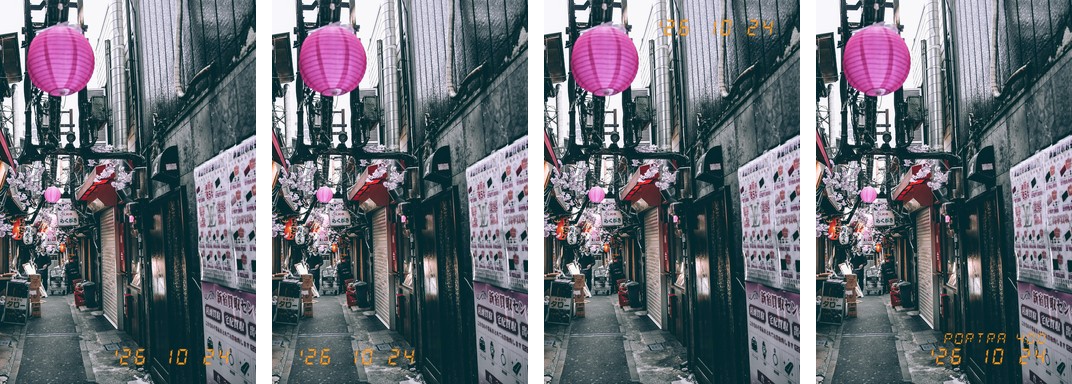
- On vertical shots the date stamp sits in the corner you chose of the photo as it is shown, reading upright.
- Bottom right, bottom left, top right and the two-line date and film stamp all follow the photo as it is shown.
- Grip up, grip down or the camera upside down: the stamp is upright either way. The direction comes from the camera’s orientation sensor, the same one that rotates your photos.
- Size and margins are the same as on landscape shots, which are unchanged.
The four settings
The same vertical shot, from left to right: bottom right, bottom left, top right, date and film.
How to upgrade
- Generate a new firmware in the firmware store and install it as before.
- Open MENU → GRLife Pro → Info: when the second line reads v1.27 you are on the new version.
- Keep the date stamp on as usual (GRLife Pro → Date stamp); vertical shots turn it upright by themselves, nothing else to set.
Good to know
- With the lens pointing straight up or down (shooting the ground at your feet, say), the camera may not tell portrait from landscape, and the stamp follows what the camera decides.
- Supports GR IIIx 1.60 / 1.70 and GR III 2.10 / 2.20; confirmed on a GR IIIx with 1.70.
- Installing unofficial firmware carries risk: keep the stock firmware so you can go back.
This post was first sent by email to GRLife users. To get the next one, sign in and turn on email notifications in Account settings.