
GRLife Pro v1.29: grain more like film, faster playback
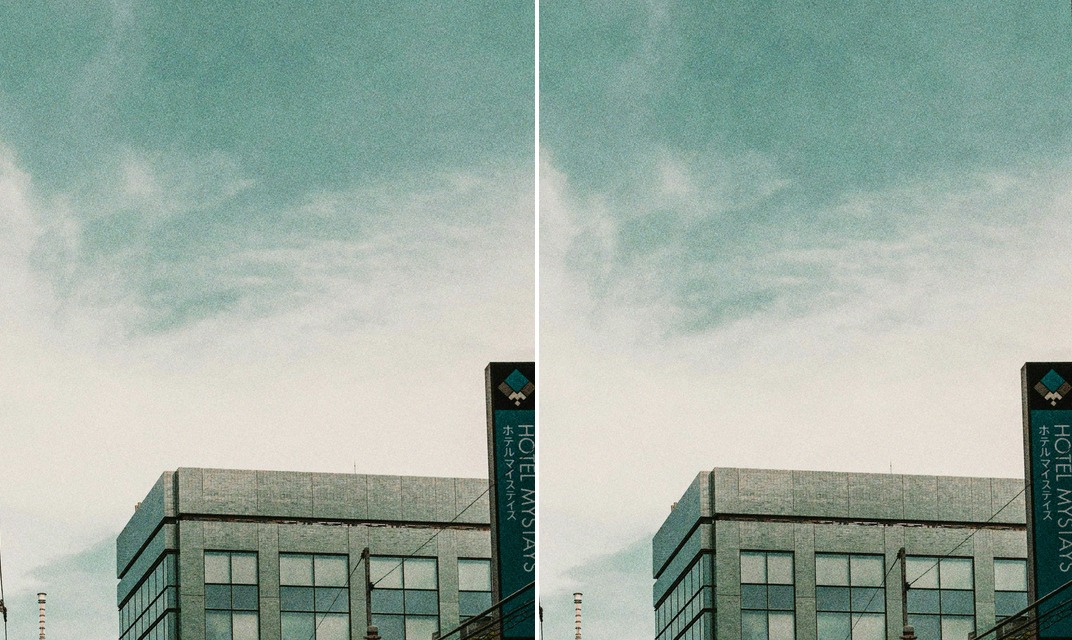
Until now the film grain matched a negative scan at 100 %, but on a phone, looking at the whole photo, it was too fine to see. GRLife Pro v1.29 adds the larger, uneven grain clumps of a negative scan, so a whole photo looks like film even on a phone. Film softness and grain are also more than twice as fast, so the wait for playback right after a shot drops from over 4 s to about 2 s.

What’s new
- Film grain now has the larger, uneven clumps of a negative scan. They show most in flat areas such as sky and walls, and give a whole photo a film look even on a phone.
- At 100 %, the fine grain is the same as before.
- Film softness and grain are more than twice as fast: with both on, a photo now takes about 0.2 s instead of about 0.5 s (measured on a GR IIIx 1.70). Pressing playback right after a shot now means a wait of about 2 s instead of over 4 s.
- No settings to change: your grain level stays as it is.
The same sky, on a phone
Left the v1.28 grain, right v1.29: an even fine sand on the left, soft patches of lighter and darker grain on the right.
How to upgrade
- Generate a new firmware in the firmware store and install it as before.
- Open MENU → GRLife Pro → Info: when the second line reads v1.29 you are on the new version.
- Take a shot with film grain on in a film bay position, and look at the whole photo on your phone.
Good to know
- Grain works in the film bay positions, with the same Off / Low / Medium / High levels as before.
- Supports GR IIIx 1.60 / 1.70 and GR III 2.10 / 2.20; confirmed on a GR IIIx with 1.70.
- Installing unofficial firmware carries risk: keep the stock firmware so you can go back.
This post was first sent by email to GRLife users. To get the next one, sign in and turn on email notifications in Account settings.