
GRLife Pro 2.0 update: changing films is faster
Some of you told us the 2.0 film page still felt slow. This update speeds up every step of changing films, and renames a MENU row that was easy to misread.
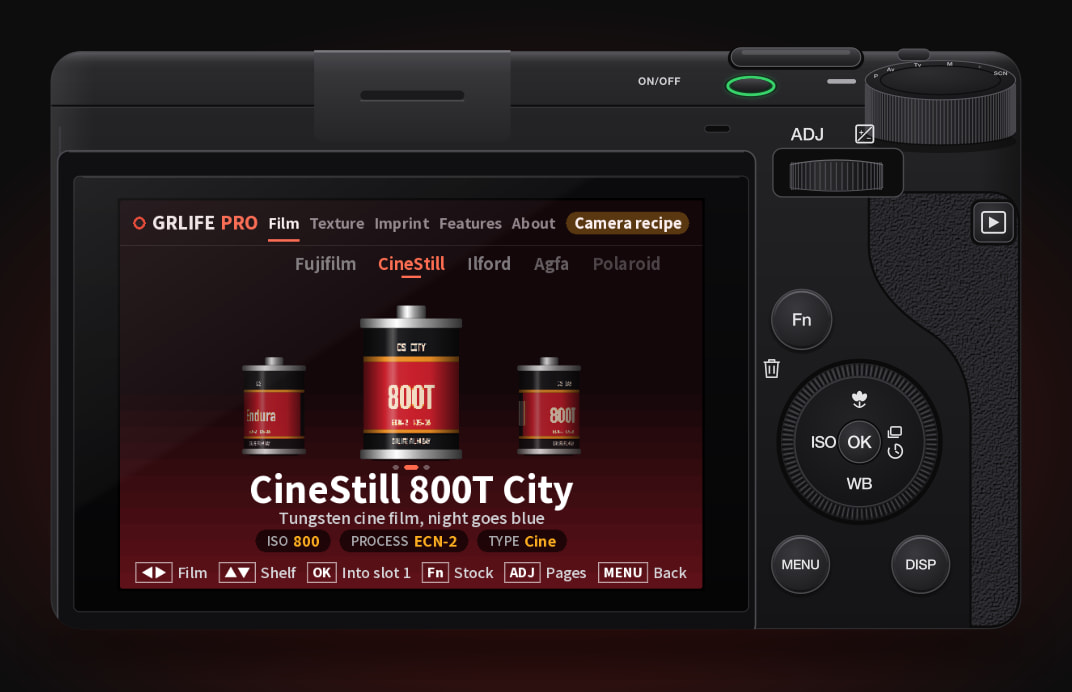
 CineStill 800T City
What changed
- Picking a film is faster: The film goes in the moment you press OK, and the canister’s drop now takes about 0.1 s before you are back to shooting. Closing the interface no longer writes a log to the card first.
- A smoother glide left and right: Films slide to the middle twice as fast.
- Instant group changes: ▲▼ no longer slides and fades the new group in: it is there at once.
- The MENU row is now “GRLife Pro shortcut”: In MENU › GRLife Pro, “OK opens GRLife Pro” was easy to mistake for a way in. It is now “GRLife Pro shortcut”, with the options “OK while shooting” and “Off”. The same switch on the About tab has the new name too.
- Install steps as a flow chart: The 2.0 store page now shows installing as five steps: which files go on the SD card, and the roughly 10 seconds the camera needs on its first start to copy them.
How to update
- Open the GRLife Pro 2.0 store, build again from the official firmware, and download the new ZIP.
- Flash the new firmware as the flow chart on the page shows.
- Copy GRLPRO.GRP from the ZIP’s GRLIFE folder into the GRLIFE folder on the card, replacing the old one. Keep the FILMS.GRF already on the card; don’t overwrite it with the ZIP’s copy, which holds only the five built-in films.
- Turn the camera on and wait about 10 seconds while it copies the new app into the camera.
Replacing only GRLPRO.GRP (steps 3 and 4) already gives you the faster film page; the renamed MENU row and closing without writing to the card come with the new firmware. Still on v1.4x? The same steps take you straight to 2.0.
This post was first sent by email to GRLife users. To get the next one, sign in and turn on email notifications in Account settings.