
Custom firmwareFraming and composition
Golden ratio guides
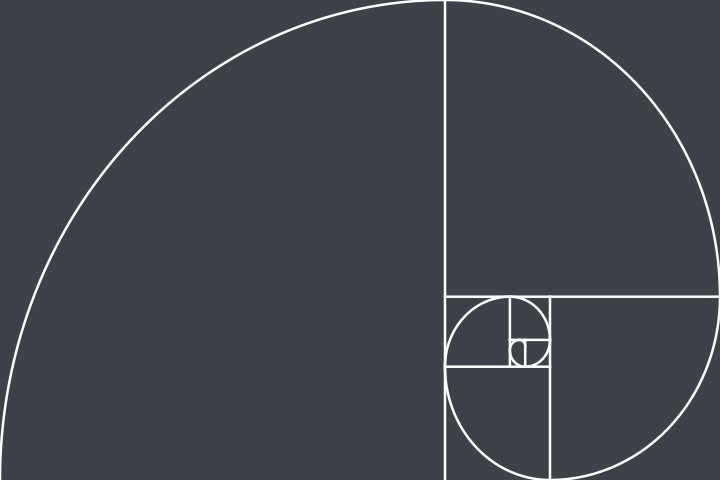
Adds a golden ratio grid and golden spirals in four directions to the camera’s own grid style menu.
- Golden ratio grid
- Golden spirals in four directions
- The stock 3×3 and 4×4 stay
After flashing, switch it on on the Features page of GRLife Pro in the camera.
What it does
- Golden ratio grid: two lines each way, at 0.382 and 0.618 of the frame
- Golden spiral: its centre can sit lower right, lower left, upper right or upper left
- The stock 3×3 and 4×4 grids stay; switch in the same menu
How to use it in the camera
- Switch it on on the Features page of GRLife Pro.
- Turn on the grid guide, then choose under the grid style.
- With “Nine ADJ settings” switched on, you can also switch the grid style straight from ADJ.
Requirements and limits
- The guides are drawn inside the photo of the current aspect ratio: at 3:2, 4:3, 16:9, 5:4 and 7:6 the spiral is stretched to the whole photo, at 1:1 and 65:24 it sits in a centred golden rectangle.
- The chosen guide is kept separately at shutdown, so after flashing back to the stock firmware the grid shows 3×3.
Testing status
Verified on a GR IIIx 1.70; still keep the stock firmware to flash back.
FAQ
Do the guides end up in the photo?
No. The guides show only while shooting, and the photos themselves are not changed; playback still shows 3×3.
Does “More aspect ratios” need to be on?
No. If it is on, the guides are drawn inside the photo of the current aspect ratio.
What happens after flashing back to the stock firmware?
The chosen guide is kept separately at shutdown, so after flashing back to the stock firmware the grid shows 3×3.
Custom firmware, test version · The result is unofficial firmware and flashing carries risk; back up first and keep the official firmware.
Other features
- GRLife ProSwap films from the SD card in the camera, with grain, diffusion and an imprint (date and caption).
- HDR photosEach JPEG carries an HDR gain map, so highlights look brighter and more detailed on HDR screens.
- Live photosWith every photo, the camera also saves a short silent clip from just before and after the shutter; once exported, it is a photo that moves in your phone’s library.
- Recipes (parameters)Preset nine parameters on the stock image controls; the stock looks stay, and one or two slots is fine.
- More aspect ratiosAdds five aspect ratios: 7:6, 5:4, 4:3, 16:9 and full-width 65:24.
- Half frameTwo portrait shots become one 3:2 photo with a black line between them, just like a half-frame film camera.
- Rail levelThe level becomes two rails; the camera is level when the dot sits in the ring and turns green.
- Anamorphic lensWith a 1.25× or 1.20× anamorphic widescreen lens mounted, live view and photos are desqueezed in the camera into a wide frame with normal proportions.
- Nine ADJ settingsADJ Mode Setting grows from 5 to 9 settings, and the ADJ strip shows them all at once.
- Rear dial sets ISOTurn the rear dial (the ring around the four-way controller) to change ISO directly while shooting, without pressing the ISO key first; below the lowest ISO is AUTO.
- Snap distance in feetThe snap focus distance reads in feet: in the menus, on the shooting screen and in ADJ, 2.5m shows as 8ft.