
Custom firmwareFraming and composition
Rail level
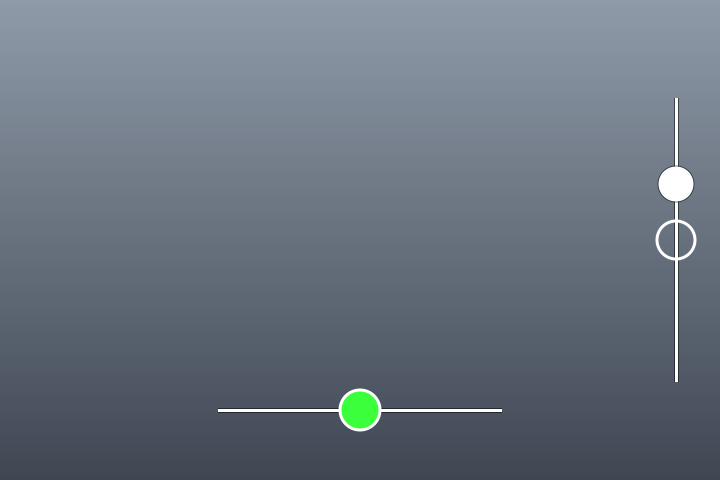
The level becomes two rails; the camera is level when the dot sits in the ring and turns green.
- The bottom rail shows roll
- The right rail shows pitch
- The dot turns from white to green inside the middle ring
After flashing, switch it on on the Features page of GRLife Pro in the camera.
What it does
- The bottom rail shows roll
- The right rail shows pitch
- The dot turns from white to green inside the middle ring
How to use it in the camera
- Switch it on on the Features page of GRLife Pro.
- In the camera, choose Type 3 under the electronic level design to get the rails; Type 1 and Type 2 keep the stock look.
- With the electronic level type set to roll and pitch, both rails are shown; set to roll only, just the roll rail is shown.
Testing status
Verified on real cameras across the GR III and GR IIIx ranges; still keep the official firmware so you can flash back.
FAQ
Can I still use the stock level styles?
Yes. Type 1 and Type 2 keep the stock look, and you can switch back any time.
Can I show only the left–right tilt?
Yes. With the electronic level type set to roll only, just the roll rail is shown.
Custom firmware, test version · The result is unofficial firmware and flashing carries risk; back up first and keep the official firmware.
Other features
- GRLife ProSwap films from the SD card in the camera, with grain, diffusion and an imprint (date and caption).
- HDR photosEach JPEG carries an HDR gain map, so highlights look brighter and more detailed on HDR screens.
- Live photosWith every photo, the camera also saves a short silent clip from just before and after the shutter; once exported, it is a photo that moves in your phone’s library.
- Recipes (parameters)Preset nine parameters on the stock image controls; the stock looks stay, and one or two slots is fine.
- More aspect ratiosAdds five aspect ratios: 7:6, 5:4, 4:3, 16:9 and full-width 65:24.
- Half frameTwo portrait shots become one 3:2 photo with a black line between them, just like a half-frame film camera.
- Golden ratio guidesAdds a golden ratio grid and golden spirals in four directions to the camera’s own grid style menu.
- Anamorphic lensWith a 1.25× or 1.20× anamorphic widescreen lens mounted, live view and photos are desqueezed in the camera into a wide frame with normal proportions.
- Nine ADJ settingsADJ Mode Setting grows from 5 to 9 settings, and the ADJ strip shows them all at once.
- Rear dial sets ISOTurn the rear dial (the ring around the four-way controller) to change ISO directly while shooting, without pressing the ISO key first; below the lowest ISO is AUTO.
- Snap distance in feetThe snap focus distance reads in feet: in the menus, on the shooting screen and in ADJ, 2.5m shows as 8ft.